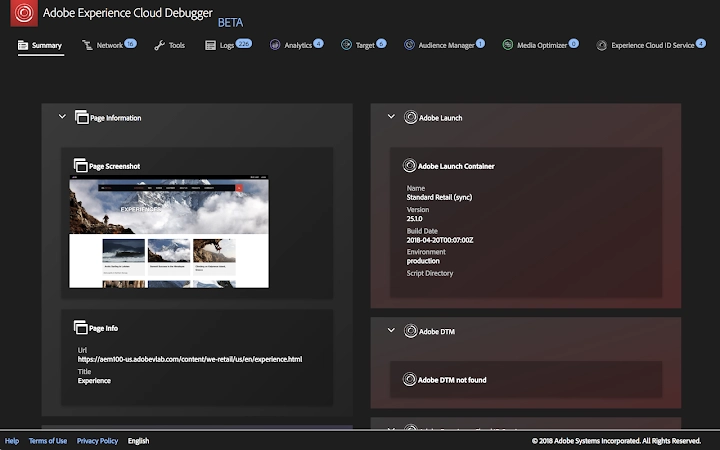

Adobe Experience Cloud Debugger
Download the latest version of the Adobe Experience Cloud Debugger for seamless tag inspection and troubleshooting across key Adobe solutions.
Overview
The Adobe Experience Cloud Debugger is a specialized browser extension designed to assist developers and digital experience professionals in inspecting and validating tags across multiple Adobe Experience Cloud solutions. It supports Adobe Analytics, Adobe Target, Adobe Audience Manager, Adobe Media Optimizer, Experience Cloud ID Service (ECID), Dynamic Tag Management (DTM), and Launch. This tool enables real-time monitoring of tag behavior, helping users verify data collection accuracy, debug implementation issues, and ensure proper configuration before deployment. The primary purpose is to streamline the development and QA process by providing visibility into how tags are triggered and what data is being sent. It is particularly useful for teams managing complex digital experiences across websites and mobile applications. The developer, Adobe, is a well-established name in digital marketing and experience management platforms. The extension is intended for technical users such as front-end developers, digital analysts, and implementation specialists working within enterprise environments. Real-world use cases include validating tracking setup during website updates, troubleshooting discrepancies in conversion data, and verifying audience targeting logic in real time. The tool is designed to integrate directly into the browser workflow, making it accessible during development and testing cycles.
Key Features & Capabilities
- Multi-Solution Tag Inspection – Enables real-time visibility into tag execution across Adobe Analytics, Adobe Target, Audience Manager, and other core Experience Cloud services.
- Debug Mode Switches – Includes toggle options to enable Target mboxTrace and DTM console debugging, allowing developers to capture detailed execution logs.
- Staging Library Support – Offers the ability to load DTM staging libraries instead of production versions, facilitating safe testing in non-live environments.
- ECID and Data Flow Monitoring – Tracks the Experience Cloud ID Service (ECID) and data flow between services, helping ensure consistent identity resolution.
- Integration with Launch and DTM – Provides native support for both Adobe Launch and Dynamic Tag Management, simplifying the debugging process for modern tag management workflows.
These capabilities allow developers to validate tag firing sequences, identify missing or incorrect data, and troubleshoot issues without requiring backend access. For example, a developer can use the extension to confirm that a specific event is being sent to Adobe Analytics during a user interaction. Similarly, a digital analyst can verify that a Target activity is correctly applying a visual change based on audience criteria. The tool enhances collaboration between technical and marketing teams by offering a shared, transparent view of tag behavior, reducing miscommunication and accelerating issue resolution.
User Interface, Workflow & Performance
The Adobe Experience Cloud Debugger presents a clean, focused interface within the browser’s developer tools panel. Navigation is straightforward, with clearly labeled sections for each supported service. Users can toggle debug modes and view real-time logs of tag activity without disrupting the normal browsing experience. The workflow is designed to integrate seamlessly into existing development practices, requiring minimal setup. Once installed, the extension activates automatically when visiting a page using Adobe Experience Cloud solutions. The developer did not specify resource usage details, so performance impact remains general. However, based on typical browser extension behavior, the tool is expected to have a minimal footprint on CPU and RAM during active use. Stability is assumed to be consistent with Adobe’s standard release practices, though no public performance benchmarks were provided. The extension operates primarily in the foreground during active debugging sessions, with no known background processes. Users can expect reliable operation during testing cycles, though prolonged use may vary depending on site complexity and network conditions.
Compatibility & System Requirements
The Adobe Experience Cloud Debugger is compatible with Windows and Mac operating systems, supporting modern versions of major browsers. The installation size is 3.5 MB, indicating a lightweight deployment. The software version is 1.0.1, released on April 1, 2024. Exact system requirements were not listed by the developer. Compatibility information is limited to the operating systems mentioned. No specific hardware specifications were provided. Users should ensure their browser supports extensions and has developer tools enabled. The extension is designed to work within the context of web pages using Adobe Experience Cloud services. Platform compatibility is expected to align with standard browser requirements for extension development. For users managing multiple environments, the tool’s ability to switch between staging and production libraries adds flexibility. However, the developer did not specify whether it supports all major browsers or only specific ones.
Pros and Cons
Pros
- Free to use, making it accessible for teams of all sizes.
- Supports a wide range of Adobe Experience Cloud solutions in a single tool.
- Enables real-time tag inspection and debugging during development and testing.
- Includes staging library loading for safer testing.
- Offers debug toggles for Target and DTM, improving visibility into execution.
Cons
- No information provided on browser compatibility beyond OS support.
- Resource usage and performance impact were not specified.
- Requires familiarity with Adobe Experience Cloud solutions to use effectively.
- Only available as a browser extension, limiting broader system integration.
- Does not include automated reporting or analytics dashboards.
FAQ Section
Is the Adobe Experience Cloud Debugger free to download?
Yes, the Adobe Experience Cloud Debugger is available at no cost. It is provided as a free tool for developers and technical users working with Adobe Experience Cloud solutions.
Which browsers are supported?
The developer did not specify which browsers are supported. The extension is known to work on Windows and Mac systems, but exact browser compatibility information was not provided.
Can I use this tool for production site debugging?
While the tool can be used on production sites, Adobe recommends reviewing your enterprise terms of use before deployment. It is generally advised to use staging environments for testing and debugging to avoid unintended data exposure.
Does the debugger require an Adobe account?
Yes, the debugger is designed for use within the context of Adobe Experience Cloud products. Access to the data and functionality depends on the user’s permissions within the Adobe ecosystem.
How often are updates released?
The current version is 1.0.1, released on April 1, 2024. No information was provided about the update frequency or release schedule.
Final Thoughts
The Adobe Experience Cloud Debugger stands out as a powerful, focused tool for developers and technical analysts managing Adobe Experience Cloud implementations. Its ability to centralize debugging across multiple solutions significantly reduces the complexity of tag validation and troubleshooting. The inclusion of staging library support and debug toggles adds practical value to real-world workflows. While some details like browser compatibility and performance impact remain unspecified, the tool’s core functionality is robust and purpose-built. It is especially beneficial for teams working with Adobe Analytics, Target, and Launch, where precision in tag execution is critical. For professionals in digital experience development, this extension offers a streamlined path to identifying and resolving implementation issues. With a lightweight footprint and free access, it delivers strong value. Download Adobe Experience Cloud Debugger now to enhance your tag validation process and ensure accurate data collection across your digital properties.







